Recomendación a Grupo de pacientes con MiMédico.com
Good morning. My name is Pablo Larramendi. Welcome to a new tutorial from Welcome to a new tutorial from mimed.com. Today we're going to explain how to mimed.com. Today we're going to explain how to create a group prescription.

Tutorial MiMedico.com
Guía práctica generada a partir del vídeo tutorial de MiMedico.com.
Resumen
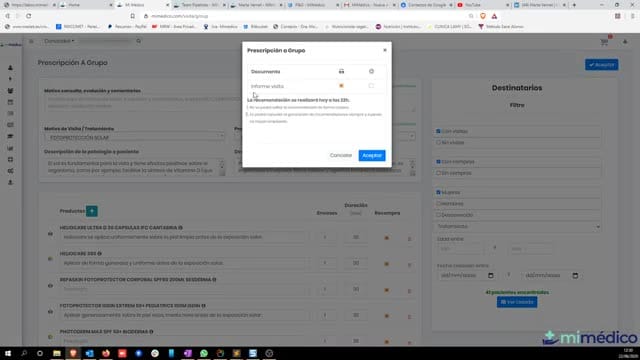
Good morning. My name is Pablo Larramendi. Welcome to a new tutorial from Welcome to a new tutorial from mimed.com. Today we're going to explain how to mimed.com. Today we're going to explain how to create a group prescription. If you create a group prescription. If you look at the sidebar, there's a new look at the sidebar, there's a new option called " option called " Group Prescription." This will work similarly Group Prescription." This will work similarly to how the Express Prescription function worked, to how the Express Prescription function worked, which allowed for which allowed for anonymous prescriptions to individual patients. The group prescription anonymous prescriptions to individual patients. The group prescription will function in much the will function in much the same way. As always, you'll find same way.
Pasos del tutorial
1. Paso 1
- Good morning. My name is Pablo Larramendi. Welcome to a new tutorial from Welcome to a new tutorial from mimed.com. Today we're going to explain how to mimed.com. Today we're going to explain how to create a group prescription. If you

2. Paso 2
- create a group prescription. If you look at the sidebar, there's a new look at the sidebar, there's a new option called " option called " Group Prescription." This will work similarly
3. Paso 3
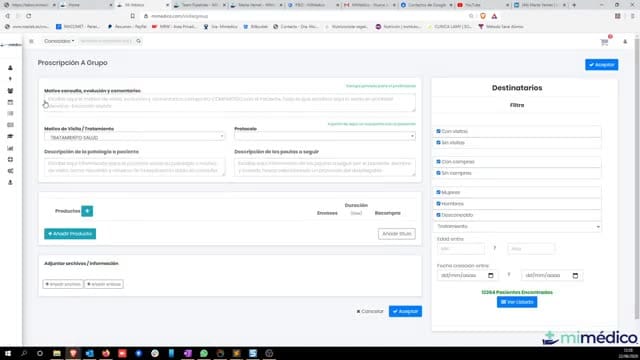
- Group Prescription." This will work similarly to how the Express Prescription function worked, to how the Express Prescription function worked, which allowed for which allowed for anonymous prescriptions to individual patients. The group prescription
4. Paso 4
- anonymous prescriptions to individual patients. The group prescription will function in much the will function in much the same way. As always, you'll find same way. As always, you'll find the reason for visit, the protocol,
5. Paso 5
- the reason for visit, the protocol, and the "Add Products" button and and the "Add Products" button and attached information for creating a attached information for creating a classic prescription. But this time, we
6. Paso 6
- classic prescription. But this time, we can select multiple can select multiple recipients at once. We can also apply recipients at once. We can also apply filters, and it will show us the patients
7. Paso 7
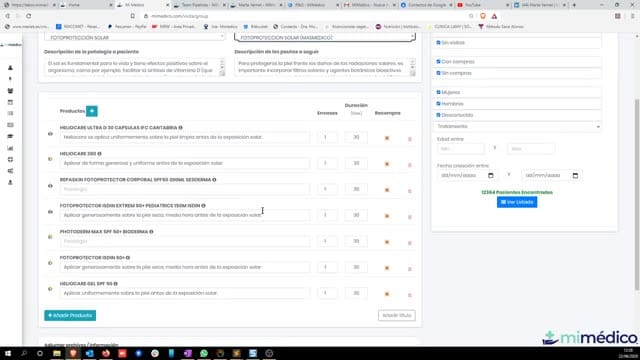
- filters, and it will show us the patients found using those filters. For example, I found using those filters. For example, I could select "Valeo sunscreen could select "Valeo sunscreen for summer," or these creams for summer. And
8. Paso 8
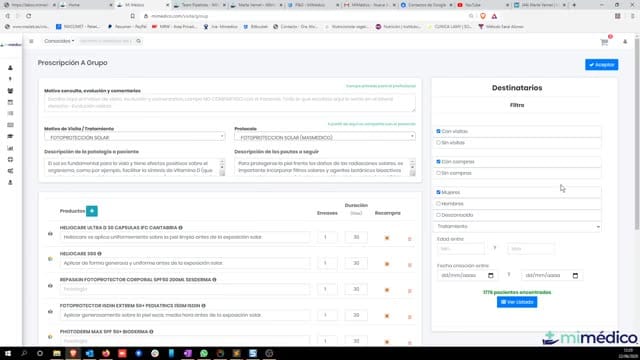
- these creams for summer. And then select all then select all patients who patients who have made purchases, have made purchases, for instance, and are for instance, and are women. It will then calculate the
9. Paso 9
- women. It will then calculate the number of recipients. number of recipients. We could also We could also select by treatment. For example, select by treatment. For example, the most recent patients who came to see me for weight loss. See me for
10. Paso 10
- me for whatever, and here it shows you. Well, with the whatever, and here it shows you. Well, with the filter we just created, how many filter we just created, how many patients has it found? Okay, if you wanted to
Preguntas frecuentes para soporte
¿Qué explica el tutorial Recomendación a Grupo de pacientes con MiMédico.com?
Good morning. My name is Pablo Larramendi. Welcome to a new tutorial from Welcome to a new tutorial from mimed.com. Today we're going to explain how to mimed.com. Today we're going to explain how to create a group prescription. If you create a group prescription. If you look at the sidebar, there's a new look at the sidebar, there's a new option called " option called " Group Prescription." This will work similarly Group Prescription." This will work similarly to how the Express Prescription function worked, to how the Express Prescription function worked, which allowed for which allowed for anonymous prescriptions to individual patients. The group prescription anonymous prescriptions to individual patients. The group prescription will function in much the will function in much the same way. As always, you'll find same way.
¿Dónde está el material fuente del tutorial?
El paquete local está en /mnt/d/Claude/claude-config/trabajos/MiMedico/Tutoriales/Recomendación a Grupo de pacientes con MiMédico.com y el vídeo fuente es https://www.youtube.com/watch?v=jFdc5JgjLrU.
¿Para qué se usa esta fuente en soporte?
Se usa para responder dudas operativas sobre la funcionalidad de MiMedico.com mostrada en el vídeo.
Fuente: vídeo tutorial MiMedico. Material generado automáticamente por Morfeo y sincronizado con la biblioteca Tutoriales MiMedico.com.